Every brand, one WinPE
Add the HP, Dell and Lenovo WinPE driver packs once. Every model starts from the same network boot, docks included.
Microsoft has retired MDT. Your deployments keep going.
Build a clean, bloat-free image, deploy it to many machines at once, and manage everything from one dashboard. For teams that found FOG, MDT/WDS or Clonezilla too hard to set up. No Intune, no scripts, no YAML.
Every feature in the trial. No SCCM, no Intune, no cloud account needed.
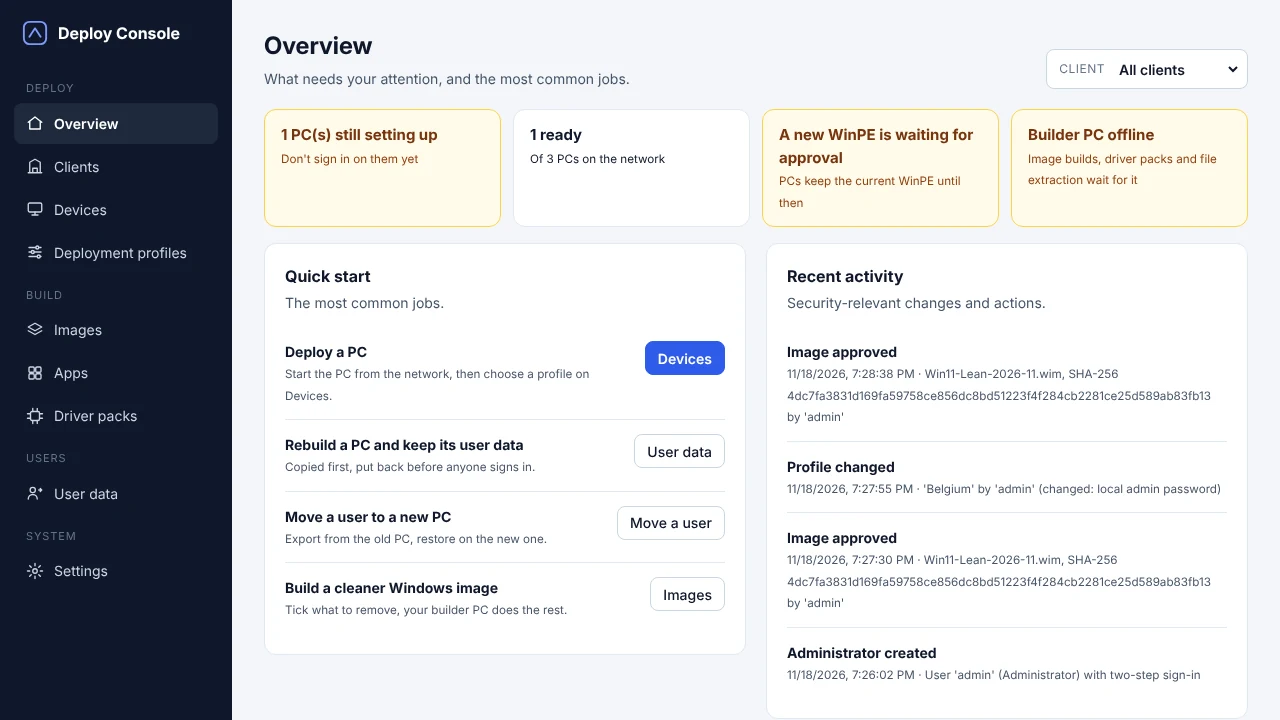
How it works
Run the setup on a Windows PC or server in your network. Create your admin account with two-step sign-in.
Pick your Windows 11 version and tick what to remove. Your builder PC adds the latest updates; you approve the image before any PC gets it.
Language, apps, Office, local admin, domain and BitLocker. One profile per office, team or type of PC.
Press F12 on the PC, pick the profile on the Devices page, and watch it go. It ends ready to sign in.
Live progress
Each PC reports every step: network start, disk, download speed, apps and the first start of Windows. You see how long each step took, and exactly where a failed PC stopped.
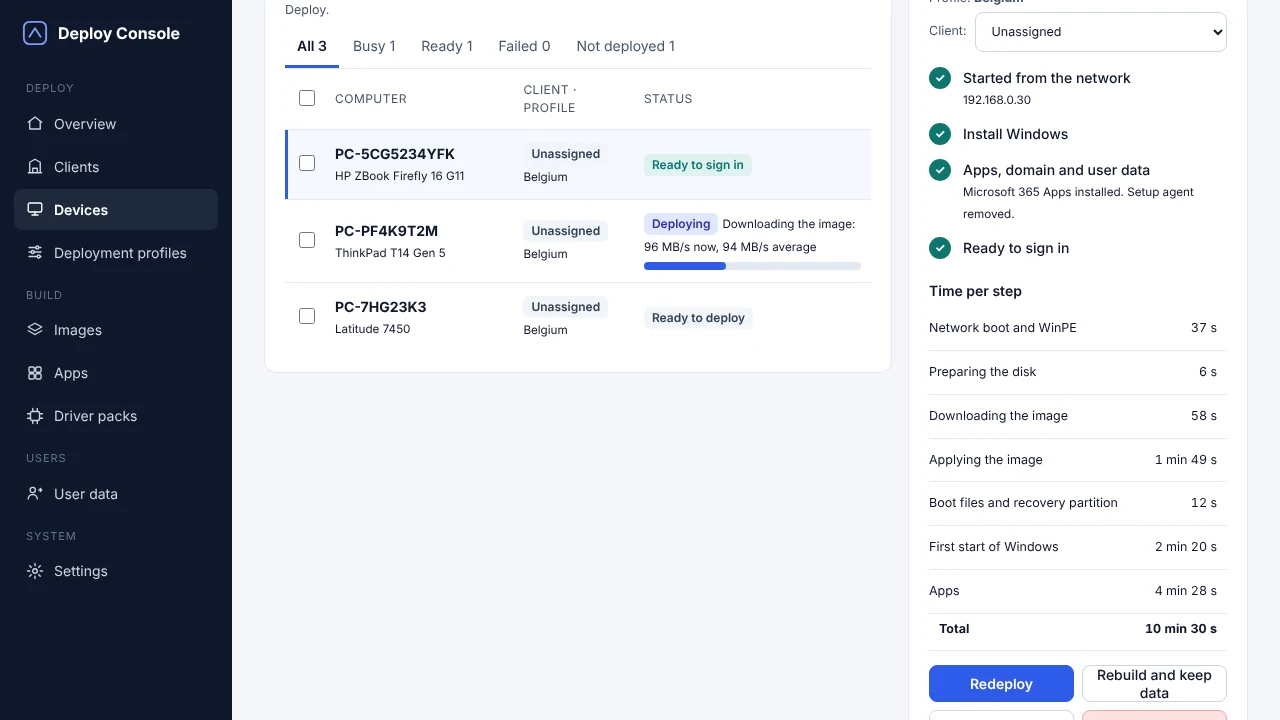
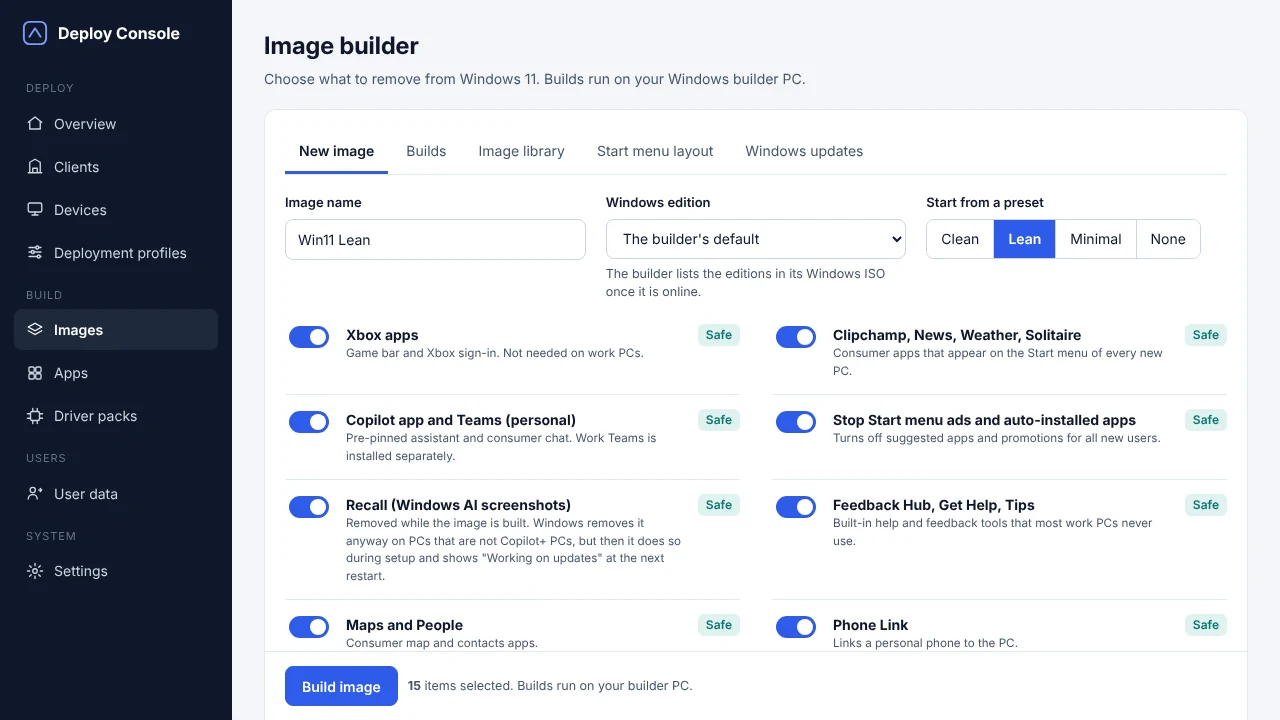
Image builder
Build from the newest Windows 11 release or an earlier one such as 25H2: the builder works from the Windows ISO you give it. The latest monthly updates go into the image, so new PCs don't start by patching.
Then pick a preset or tick switches: Xbox apps, consumer apps, Start menu ads, Recall and more. Every switch says what it does and whether it is safe.
Security starts at the image
Security never stands still, and your Windows builds shouldn't either. With an outdated image, every new PC starts life already behind. Deploy Console keeps your builds current, lean and under control, so every PC you roll out starts clean, patched and the same as the last one.
Remove the consumer apps and bloat you don't need. Less software means fewer things to patch.
Anything Windows Update depends on, such as Microsoft Edge, is locked in the builder, so PCs keep receiving patches.
Every image carries its month and is rebuilt from the same choices. You always know what is on your PCs, and earlier versions stay in the image library.
Deploy Console fetches the monthly update from the Microsoft Update Catalog and rebuilds your images, ready for your approval.
Everything in one console
Add the HP, Dell and Lenovo WinPE driver packs once. Every model starts from the same network boot, docks included.
Rebuild a PC and keep its user data: copied first, put back before anyone signs in. Or move a user to a new PC.
Language and region, apps, Microsoft 365 Apps, local admin, domain join and BitLocker, in four short sections.
Group PCs and profiles per office, department or company, and filter every page with one switch.
After setup, the vendor's own tool runs: HP Image Assistant, Dell Command Update or Lenovo System Update.
Open the dashboard from the desktop icon, which also starts the service. Or sign in from any browser on your network.
Security
Deploy Console runs on your own server. Nothing is sent to us, and the license is checked offline.
Every administrator signs in with an authenticator app, with recovery codes as backup.
Images, drivers and Office files download only through signed links that stop working after 48 hours.
Only SYSTEM and Administrators can read the setup folder on a new PC. The local admin password is removed at first sign-in.
New WinPE builds and images wait for approval. Every security-relevant change is logged with who did it.
Encrypt new PCs and hand the local admin password to Windows LAPS after setup.
PCs start from the network with Secure Boot on, so there is nothing to switch off in the BIOS.
Keep the way you work: start a PC from the network and let it install itself. Leave the task sequences, deployment shares and scripts behind.
Tutorials
Setup, your admin account and two-step sign-in. 1:19
Image, profile and network start, from start to finish. 1:40
Every feature, unlimited PCs, in your own network. No sign-up and no payment details.
Download the trialInstalls on a 64-bit Windows PC or server.
For a license, a question or help with your setup. Tell us roughly how many PCs you deploy and we'll get back to you.
info@example.comOne Windows PC or server in the same network as the PCs you deploy, and a Windows PC to build images on. The setup installs everything else.
HP, Dell and Lenovo business PCs, using the vendor's WinPE and model driver packs. Other PCs work when WinPE has a driver for their network card.
Windows 11, the newest release or an earlier one such as 25H2. The image is built from the Windows ISO you choose and gets the latest monthly updates.
No. Images, profiles and passwords stay on your server. The license code is checked offline.
Mail us for a license code and enter it in Settings. Your images, profiles and devices stay as they are.
Install, sign in, build an image and start a PC from the network. The tutorials walk you through each step.